
The client buys shops, and every shop comes with a website
The client is a retail group with a large number of locations. Part of what they sell is bought in the shop. Part is a service delivered on site, by appointment. The catalogue splits into two segments, a luxury one and an everyday one.
They grow by acquisition. They buy small independent retailers and bring them into the group. Some keep their own brand, some are moved onto the group’s. It depends on how the deal was made.
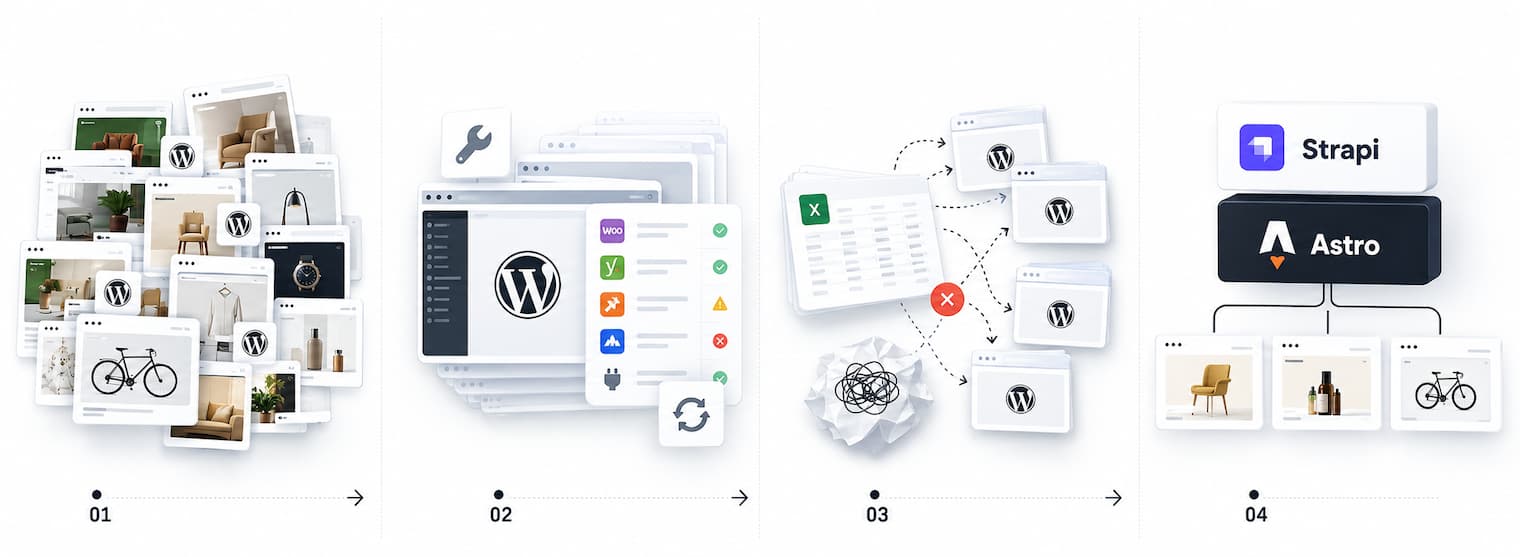
Every acquisition arrives with one or more websites. These sites usually have traffic and may or may not have a product catalogue on it. Sites run on whatever the previous owner’s agency preferred at the time.
So this is not an estate that accumulated once and then sat still. The business produces new websites as a side effect of doing business. Everything below follows from that.
What a few days of reading found
We were asked to take five sites into maintenance. All from the luxury segment, all on WordPress, all running roughly the same engine.
We spent a few days on what was there and told them what we found:
- old WordPress
- a zoo of plugins, different versions on every site
- themes built in Elementor, which looks fine in the browser and is painful to maintain
- products entered separately on every site, filled in the same way in some places and at random in others
The budget was small, so the plan we gave them was small as well. Maintenance, upgrades, and getting the zoo into some order. On WordPress. We were not proposing to replace anything at that point.
First: make them the same
We updated WordPress and the plugins everywhere and unified as much as we could.
That made the sites safer to touch. It did not make it possible to change anything across all of them at once.
Second: the tools that manage many WordPress sites
Next we looked at central management. One place, many sites, one database behind them.
We tried practically everything on the market, ten or fifteen tools. Some we took on trial, some we installed self-hosted to see how far they went. They differ in where they run and who they are built for, more technical or more for managers. Underneath that they are much the same.
None of them solved the thing that actually mattered. Sites are still hard to support. Products were still not managed centrally.
Third: the CSV detour
So we built it ourselves. Export products from each site to CSV. Generate new CSV files with the new products, half by script and half by hand. Import them back into each site through WP-CLI. We also used custom script + WP-CLI to update sites’ core and plugins.
On paper this is workable. In practice it was bad:
- only a developer could run any of it
- there was no real control over who published what, or where
- we spent a lot of time on it and most of that time was wasted
I would rather write that we went from the audit to the right answer. We did not. We spent weeks finding out that the problem was not going to be solved from inside WordPress.
What the actual problem was
Two things, and neither of them is about code quality.
Products could not be managed centrally, and that got worse with every site added. And a site on WordPress was slow to build. Not expensive, slow. A month, often several.
For a business that adds a site every time it buys a shop, that is the whole problem.
The proposal
One place for the data, many frontends.
Strapi holds products, content and everything else, centrally. Next to it, one frontend per site, generated to static. Astro for the frontends, which we had been using heavily by then and which had behaved well every time.
The client approved the scope and the budget and we started.
The dull decision that made it affordable
The first migration had no redesign in it. We ported the templates one to one, and we deliberately dragged old libraries along with them.
The markup on most pages stayed as it was. Everything under it was new.
This is the decision I would defend hardest. Rebuilding the front end at the same time as the back end would have doubled the cost of proving that the idea worked, and the client had not signed up to find out twice.
Components came afterwards, pulled out of five sites that were already running. Not designed up front.
One library, then clones
We took the repeating pieces and turned them into reusable components, each with its own settings, so a site could be assembled from parts instead of built.

The sites are multilingual, so that was built into the components rather than added to them later. A component that cannot hold a second language is a component you rewrite.
After that, most of the work on a new site is styles that override defaults which are already tested and already working.
And don’t forget that we had always tried to expose colors/images and other style related thiongs into component’s properties that inherited site’s visual settings.
At that point we had five sites that shared one product database, could each be customised down to which products appeared on them, and updated quickly.
Plugins, because Strapi manages content and not an estate
Strapi out of the box is a CMS. An estate needs more than that, so the useful work went into plugins.
Sites builder. Building from the command line was fine for us and no use to anyone else. The builder watches Strapi for changes, collects them, triggers the Astro rebuilds, and reports what changed, where and when.

Brands and products overview. Per site and per brand, where every product is currently shown, with checkboxes to turn products on and off. Worth saying here that these sites are catalogues. There is no checkout on them.

Shopify synchroniser. More on that below.
Import and export. This one exists because the client kept arriving with spreadsheets of new stock that was not in Shopify and not anywhere else, asking us to get it onto all of the sites.
The transactional side
In parallel, and separately, the group runs its actual selling on Shopify Plus. We worked on that too: custom apps for inventory and ERP synchronisation, and a custom checkout. That side was mostly backend work, done as outstaff, with several of our people embedded in the client’s team.
Once both sides were healthy, we connected them. Products sync from Shopify into Strapi, which gives the group one place where images, descriptions and the rest live in the same shape.
What came in through the door
Not everything arriving was WordPress. Wix, Squarespace. Plain static HTML. Other CMSs. Some of them nobody could name.
A few sites had no admin access left at all. The company had bought the business, and the credentials were gone. The only copy of the site we had was the one the public could see, so that is what we rebuilt from.
Four instances, for a reason that is not technical
The sites do not all run on one instance. There are four.
The reason is organisational. This is a large enterprise, and inside it departments compete with each other and do not always overlap. Same infrastructure, separate instances, and everyone keeps their own.
The same stack also carries sites that have nothing to do with products. The corporate site. Sites whose whole job is booking an appointment. That last one leans on an integration with the group’s booking system, which exposes specialist availability per location through an API, and having one engine meant we could put it wherever it was wanted.
Where it is now
Development started in 2023. The numbers today:
- 50+ sites on the stack, across four instances
- a new site takes up to a week, and most of that week is implementation of design
- before, on WordPress, a site took a month, sometimes several
- the team went from one person at the start to four or five at the busiest point
- in good months we added three to five sites, with pauses of a month or two to refactor what had accumulated

The part I would point at first: when a new site resembles one we have already built, the client’s own managers do it. We clone an existing site for them, and they change the colour scheme, load the images and handle the rest. No developer in the loop.
They run the content and the sites themselves now. Adding a site still needs us for a few things, and removing that is the next piece of work.
There is no clean sweep to report. Some sites are still on their old platforms and will move when there is a reason to move them. That work is ongoing, the same way the acquisitions are.
If your estate looks like this
Four things worth checking, in this order.
- Name the thing that cannot be managed centrally. If it is content, tools for that already exist and you should buy one. If it is product data, they will not help you, and we lost months confirming it.
- Do not redesign during a migration. Move the thing first, with its old markup if that is what makes it cheap. You are proving the architecture, not the visuals.
- Extract components after, not before. A component library designed up front is a guess. One pulled out of five working sites is a record of what actually repeats.
- The test is whether a non-developer can add a site. As long as the answer is no, you have moved the bottleneck rather than removed it.
If you are looking at an estate like this and are not sure whether it is a consolidation or fifty separate projects, that is a question worth answering before anyone writes code. We start with a couple of days of reading and a written verdict you can forward, with no obligation afterwards. See /rescue/ or software project rescue.